
Agentic Invoice Processing, Explained: From Inbox to Posted Without the Data Entry
Your team bought invoice automation, and someone still types invoices. The tool reads the PDF, then a person checks the fields, hunts the purchase order, picks the accounting codes, chases approvals, and posts the entry. Agentic invoice processing is the shift that actually removes the work: an AI agent does ...
Your team bought invoice automation, and someone still types invoices. The tool reads the PDF, then a person checks the fields, hunts the purchase order, picks the accounting codes, chases approvals, and posts the entry. Agentic invoice processing is the shift that actually removes the work: an AI agent does the whole job, and your team reviews only the bills that genuinely need a human decision. That difference, who completes the work, is the only question that matters when you evaluate what to buy. This article explains the difference in plain terms.
What is agentic invoice processing?
Agentic invoice processing is the use of AI agents to complete the entire accounts payable workflow: an agent receives a vendor invoice from any channel, reads every field, validates it against purchase orders and payment history, assigns the correct accounting codes, and posts it to the books, while a person reviews only the exceptions.
The key word is complete. Capture tools read invoices. Workflow tools route them. An agent, the way GenLedge builds them, is accountable for the outcome: a posted, payment-ready bill. If you want to watch that happen on your own invoices, you can see it on your workflow .
Why your "automation" still leaves you doing the job
Most invoice automation is optical character recognition with a nicer interface. It extracts the vendor name, the amounts, and the dates, then hands the result back to a person. The mechanical middle of the job, matching the bill to a purchase order, checking for a duplicate, coding it to the right account and cost center with the right tax treatment, routing it to the right approver, and posting the entry, stays human.
That is why AP teams with "automation" still spend their days in the queue. The tool did one step. The job has six. Capture is a feature of invoice processing. It was never the job.
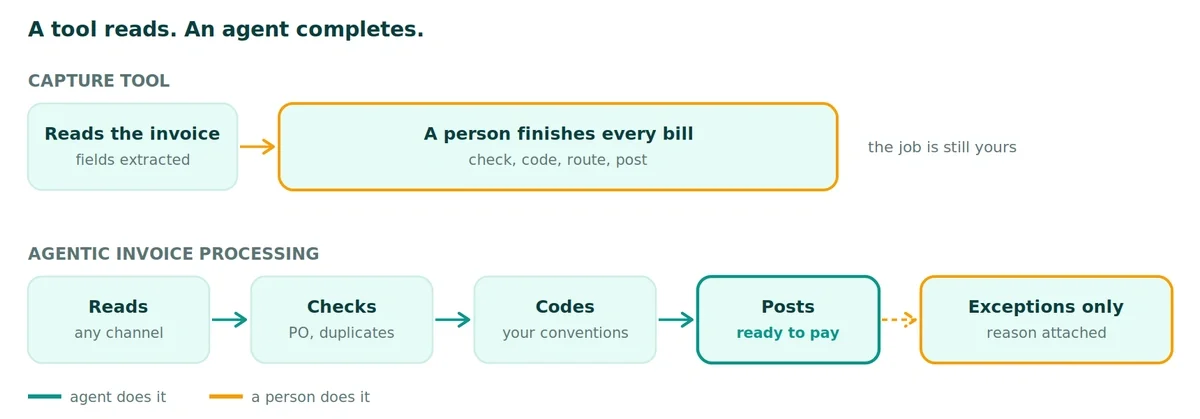
The test is simple: after the software runs, does a person still have to do something to every invoice? If yes, you own a tool. The work is still yours.
What an agent does with an invoice, step by step
Here is the whole job, the way GenLedge's agents run it today:
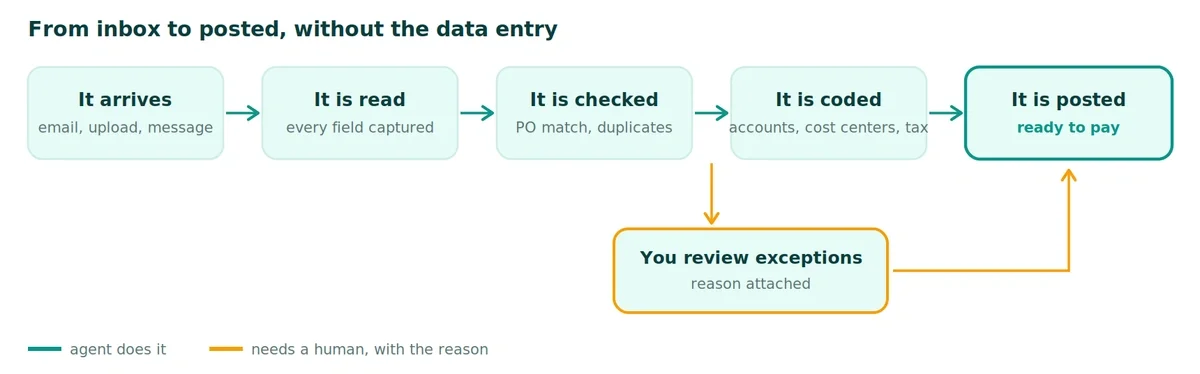
- It arrives. A bill lands by email, upload, or message, including WhatsApp. The agent picks it up on its own. Any vendor's layout, PDF or photo.
- It is read. Vendor, amounts, dates, and line items are captured. Nobody types.
- It is checked. The bill is matched to your purchase order and your payment history, and flagged if something looks off or duplicated.
- It is coded. Accounts, cost centers, and tax treatment are filled in to match how your business codes its bills.
- You review exceptions. Clean bills move ahead. Only the ones that need a human reach your team, each with the reason it was flagged.
- It is posted. Approved bills are recorded to your books in QuickBooks, Xero, or NetSuite, ready to pay. No rip-and-replace: the agent posts into the system you already run.
Notice what is absent: a step where a person keys data. The agent is not assisting the workflow. The agent is the workflow.
Exceptions are the job now
An honest automation vendor will tell you that some invoices should reach a person. A new vendor. An amount over your approval limit. A price that does not match the contract. A likely duplicate. Agentic invoice processing does not hide those cases. It routes them to your team with the reason attached, so the review takes seconds instead of an investigation.
GenLedge routes every bill by how confident the agents are. High-confidence bills from known vendors flow straight through. Moderate cases get a quick human confirm. New or unusual bills get a full review. You set those boundaries, and most teams start with everything in review and open up as trust builds. One more thing matters here: the agents interpret the invoice, but the posting itself is deterministic, executed by rules. The numbers in your ledger are never generated by AI. Every action is logged with a plain-language explanation, which is why month-end and audits become a lookup instead of a scramble. You can read more about how that control model works in GenLedge's security and trust approach ).
What changes for your AP team
Picture a Tuesday morning with 47 invoices waiting. Today, a person opens each email, downloads the PDF, types every field, hunts for the PO, checks for duplicates by hand, codes the GL from memory, then chases three managers for sign-off. By the end of the day, most are done, some are pending, and an early-payment discount quietly expired.
With agents on the job, most of those 47 are already read, matched, coded, and posted overnight. Five need a human: a new vendor to confirm, a bill over the approval limit, two price variances, and one likely duplicate. Your AP manager is through the queue by 10am and spends the rest of the morning on cash flow, not keystrokes.
In GenLedge's internal benchmarks, an invoice that took 15 minutes of human processing takes about 30 seconds of agent processing, and straight-through processing climbs from roughly 40 to 50 percent in the first month toward 85 to 90 percent by month twelve as the agents learn your vendors and your coding conventions. Actual results depend on your volumes and processes. Every correction your team makes is remembered, so the exception queue shrinks over time. The fastest way to test that claim against your own reality is to book a demo and watch an agent process your next invoice.
How to tell an agent from a tool: five questions to ask
Whatever vendor you evaluate, including us, ask these five questions:
- Who completes the work? After the software runs, is the bill posted, or is it waiting for a person to finish it?
- Does it act in your accounting system? An agent posts into QuickBooks, Xero, or NetSuite directly. A tool exports a file and calls it integration.
- Does it explain its exceptions? A flag without a reason is another investigation on your desk.
- Does it learn your coding? Your cost centers and conventions are not generic. The system should get sharper on your data, not stay static.
- Can you control what runs without review? You should decide which bills flow straight through and which always wait for a person, and change that as trust builds.
If a vendor answers all five well, you are looking at agentic invoice processing. If not, you are buying a faster version of the work you already do.
FAQ
What is the difference between agentic invoice processing and OCR invoice capture? OCR capture extracts data from an invoice and stops. Agentic invoice processing completes the workflow: reading, validation against purchase orders, duplicate checks, accounting codes, approval routing, and posting to the books, with humans reviewing only exceptions.
Does agentic invoice processing post bills without approval? Only if you configure it to. You decide which bills can flow through on their own and which need a person to sign off. Anything the system is not confident about waits for a human, with the reason attached.
What happens with unusual or problem invoices? They become exceptions. A new vendor, an over-limit amount, a price variance, or a likely duplicate is routed to your team with the reason it was flagged, instead of being processed silently or dumped back into a manual queue.
How does it know how to code our bills? The agents start from your chart of accounts and your rules, and then learn from every correction your team makes, so coding matches your conventions more closely over time.
Does it work with QuickBooks, Xero, or NetSuite? Yes. GenLedge reads bills from your inbox and messaging and posts them to QuickBooks, Xero, or NetSuite, so you get the automation without replacing your accounting system.
Stop processing invoices. Start reviewing exceptions.
The point is worth restating once: if a person still drives every step, it is not automation. Agents do the job. Your team makes the calls that need judgment. If that is the operating model you want for your AP queue, schedule a demo and we will run it on a real workflow from your business, so you can see the value before you commit.

See GenLedge on your own data
Book a free AI workshop and we'll set up a sandbox with your real data so you can judge it for yourself, before you commit to anything.